Sharing | TSMaster Security Management Module User Manual: One-Stop Configuration of SecOC and MACSec

With the in-depth development of automobile intelligence and network connectivity, the security of in-vehicle network is no longer “optional”, but the cornerstone to ensure reliable operation of vehicles. In the face of diversified security protocols such as AUTOSAR SecOC and MACSec for in-vehicle Ethernet, have you ever been troubled by complicated configuration and fragmented tool chain? We have compiled this TSMaster Security Management Module User Manual to provide you with a one-stop solution for the configuration and activation of security protocols.

Keywords:security management, , ,SecOC protocol, , ,PDU, ,MACSec protocol


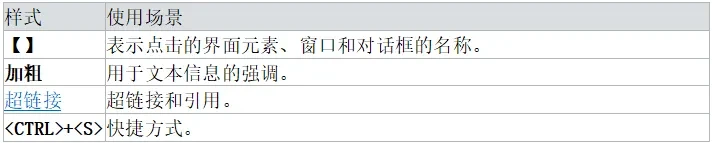
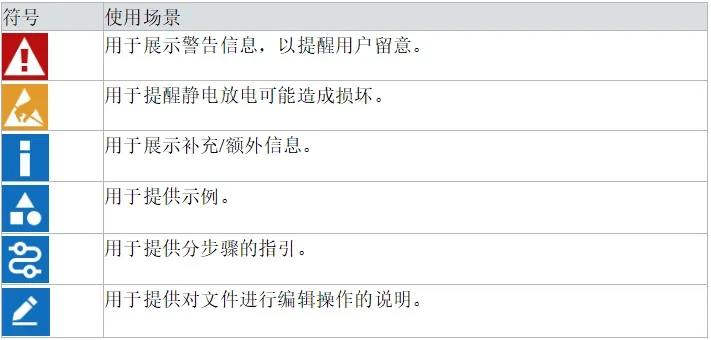
Some of the styles and symbols used in this article can be found in the following table descriptions.

Style Sheet Description
Symbol Table Description

The Security Management module is used to configure and activate various security protocols. In addition to standard protocols, the module also supports the use of customized security plug-ins.

Currently, the module supports the SecOC (Secure Onboard Communication) protocol for AUTOSAR and the MACSec (Media Access Control Security) protocol for Ethernet.


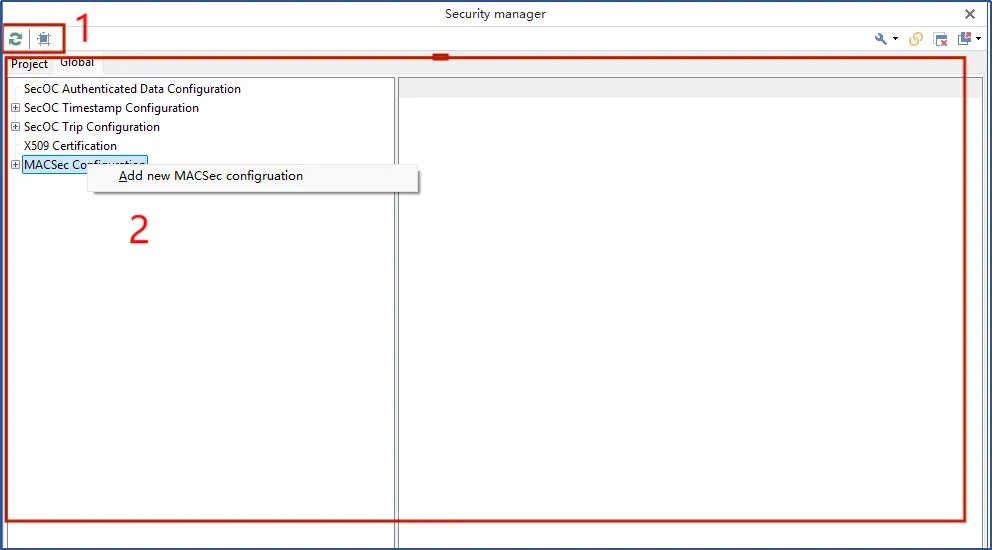
The Security Management Module main form includes:

  • toolbar (in computer software)
  • main window
technical articles 20251114 1 MACSec

3.1 main window

The security management module is architecturally divided into two parts:

  1. Security Configuration: Responsible for the setting of global security parameters, such as keys, certificates, and so on.
  2. Project Configuration: Responsible for database settings related to specific projects, such as specifying which messages or PDUs need to have security mechanisms applied.

The actual configuration process is as follows: first determine the type of security protocol required and complete its security configuration, followed by importing the database and completing the project-related configuration.

3.1.1 Security Configuration (Global Tab)

The security configuration is global and shared by all projects on the computer and, at the same time, is not copied with the project to other computers. This means that none of the security-related files such as keys and certificates will take effect directly on other computers, but will need to be reconfigured.

The main protocols currently supported include:

SecOC: A security algorithm that generates an authentication code for a PDU. The receiving node uses the same algorithm and key for authentication, and discards the PDU if the result does not match.SecOC transmits PDUs in clear text, which is more secure than E2E (end-to-end protection), and often coexists with E2E in practice.

MACSec: An Ethernet security standard based on IEEE 802.1 AE that encrypts data (including IP addresses) at the link layer. Similar to TLS, MACSec also supports key exchange. Configuration can be added or deleted via the right-click menu.

typologyinstructions
SecOC data validationFresh values are derived from the PDU data itself and the ARXML file should be defined accordingly for each PDU.
SecOC timestamp verificationFresh values are based on timestamps. Since the time synchronization message format is not standardized, it usually needs to be implemented with a plug-in.
SecOC Synchronized ChecksumFresh values are based on synchronization counts with PDU counts.
certificatesFor the time being, it can only be used to parse part of the information in X.509 certificate.
MACSecMACSec configuration for Ethernet, currently supports software implementation.

3.1.2 Project Configuration (Project tab)

The engineering configuration is specific to the current project and is used to set specific security policies. For example, communication channels with security protocols enabled, specific messages or PDUs that need to be security verified, and so on.

technical articles 20251114 2 MACSec

3.2 menu bar

The form icons are described below:

technical articles 20251114 3 MACSec


4.1 MACSec

configuration itemDescriptive
name (of a thing)Configuration name, which should remain unique. The first one will be executed by default in case of renaming.
MACSec ModeIntegrity_Only: Integrity protection only; Confidentiality_Offset_0: Integrity and confidentiality protection starting at 0 byte position; Confidentiality_Offset_30: Integrity and confidentiality protection starting at 30 byte position; Confidentiality_Offset_50: Integrity and confidentiality protection starting at 50 byte position. Offset_50: Integrity and confidentiality protection starting at 50 byte position.
encryption suiteEncryption algorithms allowed for negotiation (multiple choice).
Allow unprotected frames to passWhether to allow frames with MACSec protection to pass.
delayed protectionWhether to enable delayed protection.
PSK Configuration
CKNConnection key.
CAKConnection association key.
replay configuration
replay protectionWhether replay attack protection is enabled.
Replay WindowReplay protection window size.
Key Server Configuration
keyserver policyPolicies can be negotiated through prioritization, or forced to be specified.
MKA Key Server PrioritizationUsed during negotiation, the lower the priority the more preferred it is to be the server.
MKA hello timeMKA Hello message interval (milliseconds).
MKA bounded hello timeMKA Bounded Hello time in milliseconds.
Port Configuration
SCI port numberSCI port number.
Sent immediately upon discovery of the opposite endWhether or not to send data as soon as the pair is discovered.
Safety Label Configuration
Includes SCIWhether or not the SCI is included in the security label.
Usage Terminal Flag BitWhether or not to use the end station flag bit.
Key Update Configuration
General Packet Number RestrictionsPacket number limit for normal packets.
XPN Package Number RestrictionsPacket number limitation in XPN mode.
session overtimeSession timeout in milliseconds.
Payload limitationPayload limitations.
Table 1: Supported security types

The MACSec protocol stack for TOSUN devices requires key exchange via the MKA protocol and does not currently support direct configuration of symmetric encryption keys. Users must specify the channel's role within MKA; prioritize determining this configuration.

MACSec channel configuration is more concise and currently only requires configuration of the Ethernet channel to specify the MACSec configuration used and the MAC address used by the MKA protocol.

The MAC address will be automatically obtained from the relevant configuration of the other interface.

4.2 SecOC

4.2.1 SecOC configuration

SecOC currently supports three ways of handling fresh values: using a portion of the data, using timestamps, and using synchronized messages and counters.

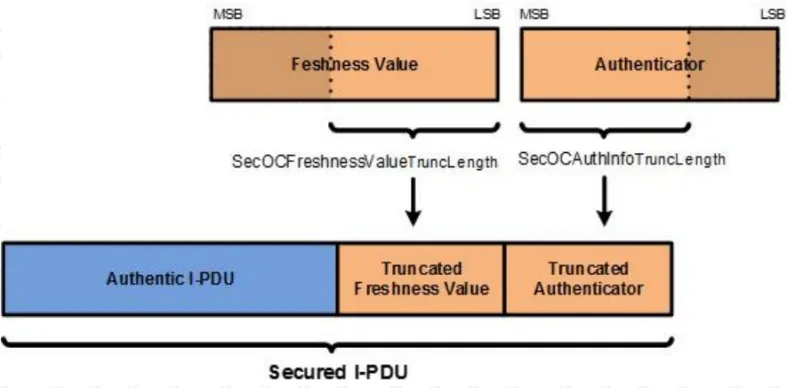
There are three configuration items for how fresh values are handled, the first is the length of the fresh value in bits. After calculating the validation result, both the fresh value and the validation need to be truncated to accommodate the communication bandwidth (e.g., the length limit of the CAN PDU). While truncating the validation information slightly reduces security, it is still within acceptable limits. The truncation length of the fresh value and the truncation length of the authentication message together determine the actual length of the security message sent.The SecOC intercepts the second half of the fresh value and the first half of the authentication message to combine them.

SecOC Data Structures (1)
Figure 24: DBC Template Selection Page

Key and Algorithm refer to the relevant configuration used for verification. If you need more than one key, you can add a key pair via the right-click menu, and the system will assign the corresponding key according to the Data ID in the PDU. The unmatched PDU will use the default total key.

The different fresh value modes require additional specific configuration. Note that the way timestamp and synchronization messages are sent is not explicitly defined in the protocol and therefore may require the support of a security plug-in. the ARXML file may contain the configuration for timestamp fresh values but not for synchronization fresh values, which need to be entered manually.

configuration itemDescriptive
Validation message truncation lengthUnit: bit.
Truncated fresh value lengthUnit: bit. The sum of this length and the truncated length of the authentication message is the total length of the actual security field sent, make sure it is within the protocol allowed range.
Fresh value lengthUnit: bit.
arithmeticAlgorithm for generating validation information.
keysKey used for authentication. Multiple key pairs can be added, and the system will match the corresponding key based on the Data ID of the secure PDU.

4.2.2 SecOC Channel Configuration

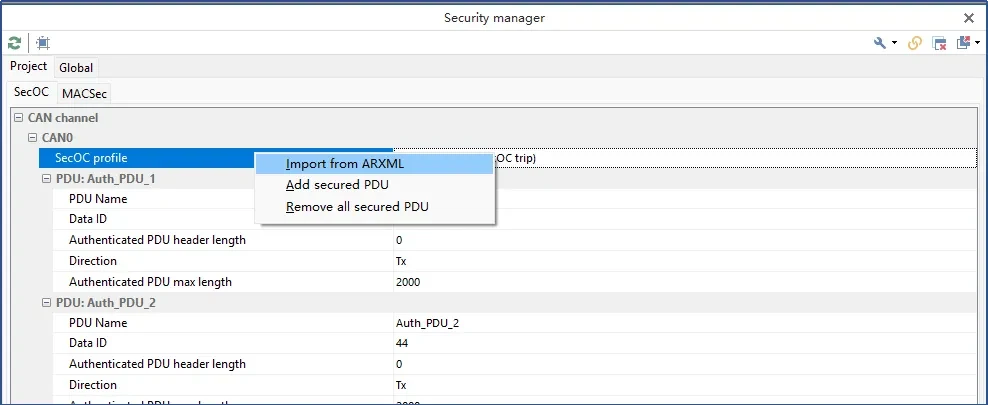
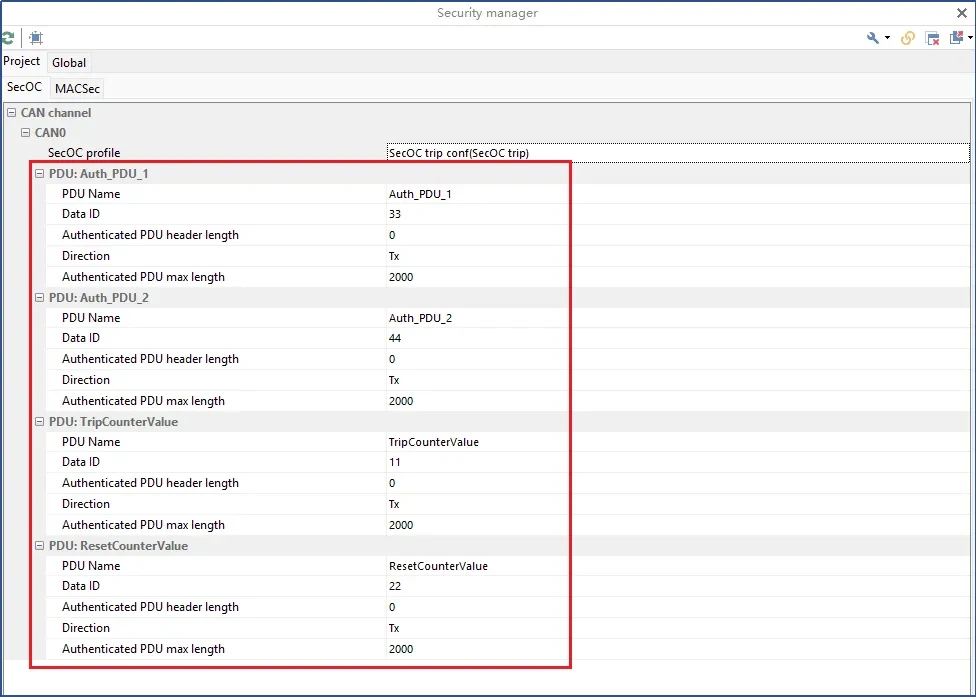
Before configuring the security PDU, please save the project first. Then you can select Import ARXML messages via the right-click menu for batch import, manual input is also supported.

technical articles 20251114 4 MACSec
configuration itemDescriptive
PDU NameNeeds to be consistent with the PDU name displayed in the database.
Data IDUsed to verify calculations and find matching keys accordingly.
Secure PDU Header LengthThe available values are 0, 1, 2, and 4 bytes.
orientationsSpecifies the PDU as either transmit or receive.
PDU Maximum LengthConfigured for the maximum length of a dynamic PDU, this length is used to preallocate memory space.


5.1 SecOC Example

Sample projects are provided with the TSMaster software. Please note that the security configuration is not taken with the project file and you can create a new configuration without modification for reference.

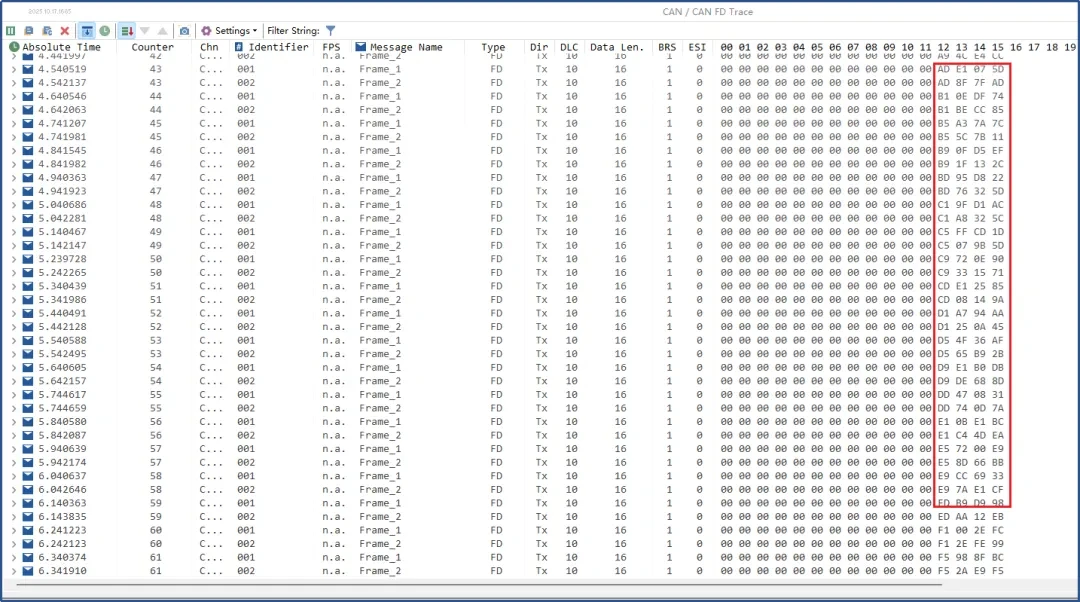
In the example, the total length of the security field is (24 + 8) = 32 bits, rounded up to 4 bytes.The ARXML database reserves this space for security PDUs. If the configured length exceeds the reservation, the PDU may still be sent, but if the total length exceeds the link layer limit, it will not be sent successfully.

technical articles 20251114 5 MACSec

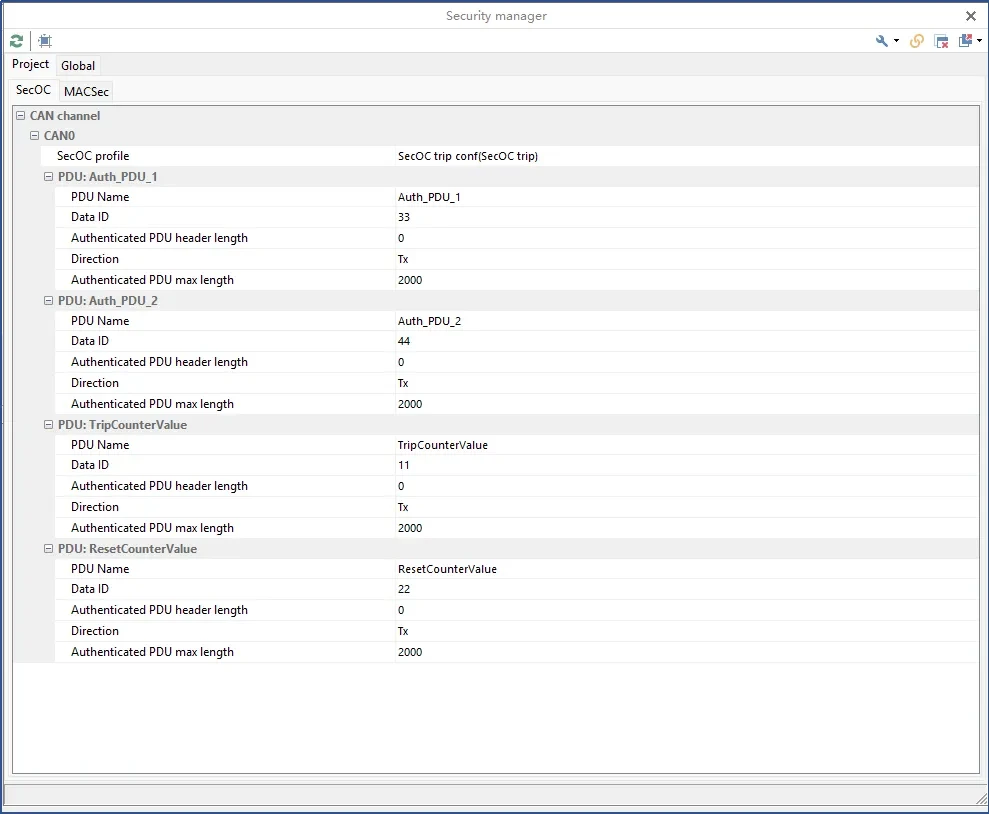
Configure 1 channel in Hardware, Channel Selection and load the database in ARXML format in Analysis, Database, CAN Database.

SecOC operates based on PDUs and must load a database capable of defining PDUs.

Once you have finished loading the database, you can import the secure PDUs defined in the ARXML. in this screen, you can add and modify the PDU information, and non-secure PDUs can also be added to this list.

technical articles 20251114 6 MACSec

The communication results can be observed by activating the sending function of the corresponding PDU in the RBS simulation.

technical articles 20251114 7 MACSec

Which feature of TSMaster are you most interested in? Or what problems have you encountered in practical applications?

Welcome to share your experience or questions in the comment section, any ideas or suggestions can also be comment section message interaction, will have the opportunity to win the TOSUN mystery gift bag Oh ~!

Tip:
1. Software download:
Click on the software download link below to download and install directly, beta version is recommended:

2. Software upgrades:
You can check for upgrades to the latest version within the software, provided that your computer has an Internet connection.

Note: TOSUN Technical Support Email:support@tosunai.cnWe welcome inquiries! (Company and contact information must be indicated)

发表回复

×
×

产品入口: 产品添加到购物车