Software Update | More Than Just an Upgrade! TSMaster November Edition Released, Unlocking Six Core Feature Experiences

Every update to TSMaster software is designed to make your engineering more efficient and your exploration more free. The November release is now available, focusing on deep optimization and expansion of core functional modules, coveringMini-program usability enhancements, API updates, advanced dashboard features, MBD functionality upgrades, sample project updates, and new hardware supportThese upgrades will significantly enhance the software's performance, flexibility, and user experience, helping you tackle complex development and testing challenges more efficiently.


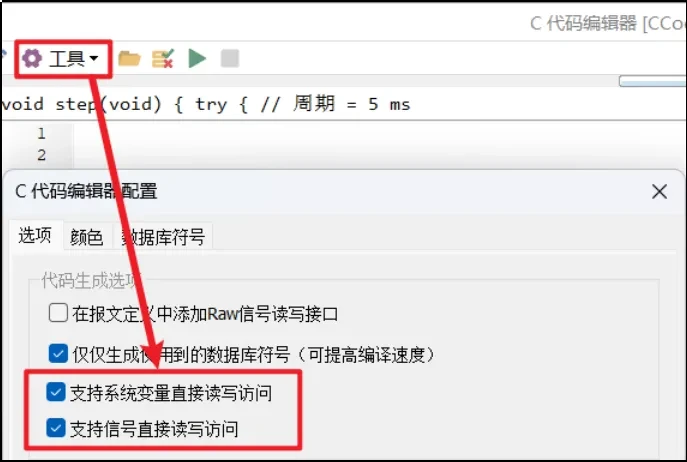
→ [Design] - [C applet]

Update function:

  • Direct read/write access to system variables option, enabled by default, automatically generates direct access code for system variables.
  • Supports direct read/write access to signals, enabled by default, automatically generating direct signal access code.
Technical Articles 20251216 1 TSMaster November Edition

Updated content:

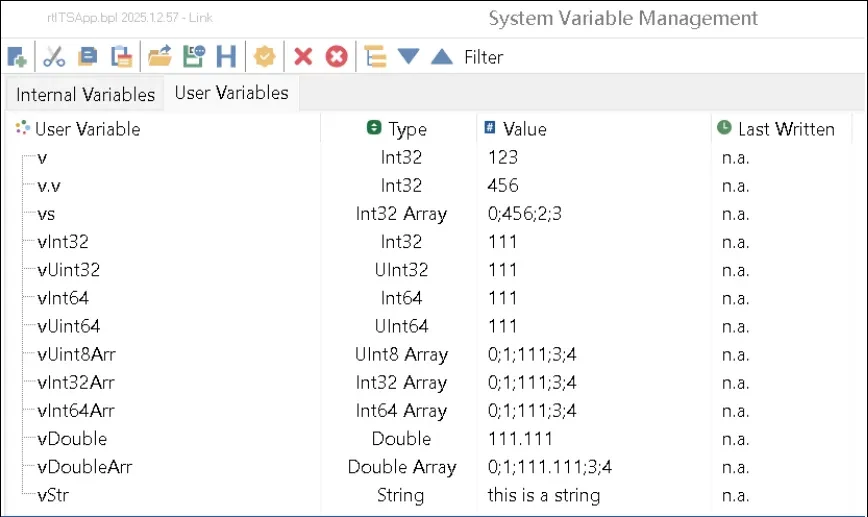
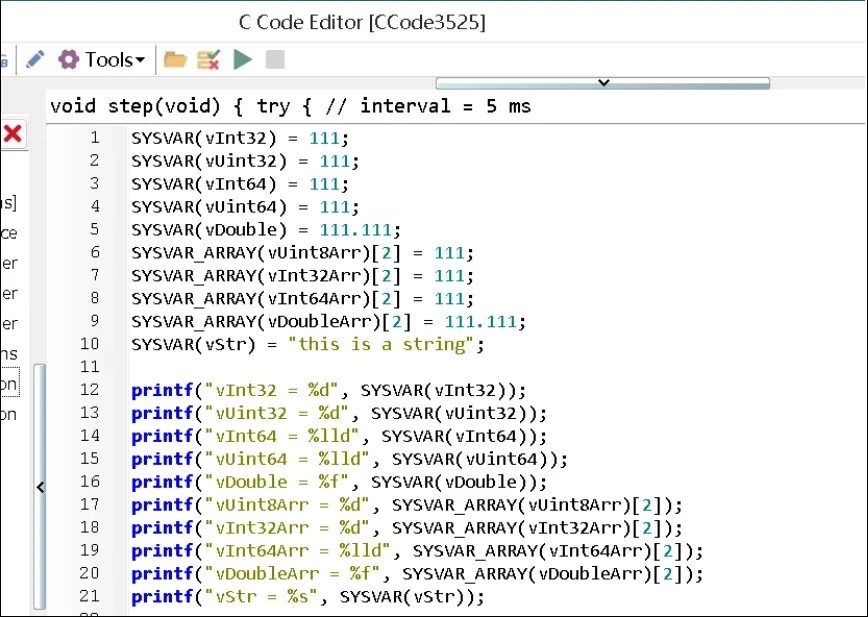
  • New array-type system variables for direct access
  • New RBS Signal Direct Access

【Array-type System Variables】In C programs, you can directly use the syntax SYSVAR_ARRAY(xArr)[i] = val;.

Technical Articles 20251216 2 TSMaster November Edition
Technical Articles 20251216 3 TSMaster November Edition

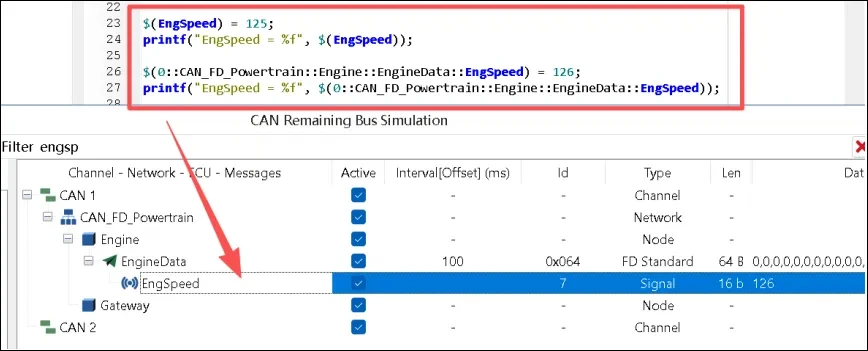
【RBS Signal】In C mini-programs, you can directly assign values to or read RBS signals, such as:

$(Engine Speed) = 125;

$(0::CAN_FD_Powertrain::Engine::EngineData::EngSpeed) = 126;
Technical Articles 20251216 4 TSMaster November Edition

→ [Design] - [Small program

rbs_set_signal_value_by_address

Function Description: Sets the value of the RBS signal using its symbolic address. This is a protocol-agnostic function that automatically detects the bus type and routes the request to the appropriate bus-specific RBS handler.

rbs_get_signal_value_by_address

Function Description: Retrieves the current value of an RBS signal using its symbolic address. This is a protocol-agnostic function that automatically detects the bus type from the symbolic address and routes the request to the appropriate bus-specific RBS handler (CAN, LIN, or FlexRay).

get_system_var_double_array_element

Function Description: Retrieves a single Double element from the system variable array at the specified index position;

get_system_var_int32_array_element

Function Description: Retrieves a single Int32 element from the system variable array at the specified index position.

get_system_var_int64_array_element

Function Description: Retrieves a single Int64 element from the system variable array at the specified index position;

get_system_var_uint8_array_element

Function Description: Retrieves a single UInt8 element from the system variable array at the specified index position;

set_system_var_double_array_element

Function Description: Sets a single Double element in the system variable array at the specified index position. This operation is synchronous.

 set_system_var_int32_array_element

Function Description: Sets a single Int32 element in the system variable array at the specified index position. This operation is synchronous.

set_system_var_int64_array_element

Function Description: Sets a single Int64 element in the system variable array at the specified index position. This operation is synchronous.

set_system_var_uint8_array_element

Function Description: Sets a single UInt8 element in the system variable array at the specified index position. This operation is synchronous and immediately updates the array element.

metric_register_can_frame_interval

Function Description: Registers a CAN frame on the specified channel. When using the cycle statistics API, registration must be performed beforehand; otherwise, the sampling list will be empty.

metric_start

Function Description: Sets the statistical state machine to RUNNING, begins recording timestamps for received frames on all registered channels, and accumulates interval data.

metric_is_running

Function Description: Returns the global runtime status. Ensure the system is in RUNNING state before reading data. Use after the metric_start function.

metric_get_can_frame_interval_stat

Function Description: Reads only the accumulated CAN cycle statistics (minimum, maximum, current value, average, standard deviation, etc.); use the next function to reset the counter.

metric_get_w_reset_can_frame_interval_stat

Function Description: Returns CAN cycle statistics while clearing the statistics data.

metric_stop

Function Description: Switches the state machine to STOPPED, halting sampling and timestamp recording. Subsequent operations can still be initiated by calling start to resume accumulation.

metric_reset_can_frame_interval_stat

Function Description: Clears the CAN frame statistics for the specified channel. Can be called in both stop and run states.

metric_reset_frames_interval_stat_of_channel

Function Description: Clears statistics by bus and channel, clearing only the specified bus and logical channel statistics. This function offers finer granularity than the previous function.

metric_reset_frames_interval_stat_of_bus

Function Description: Clear by bus, clearing only the statistics for the specified bus type;

metric_reset_frames_interval_stat_of_all

Function Description: Clears all cycle statistics, useful for resetting test cases.

metric_unregister_can_frame_interval

Function Description: Calling this function removes CAN frames from the statistics system for the specified channel, releases associated resources, and discards the channel's statistical data. The corresponding handle becomes invalid thereafter.


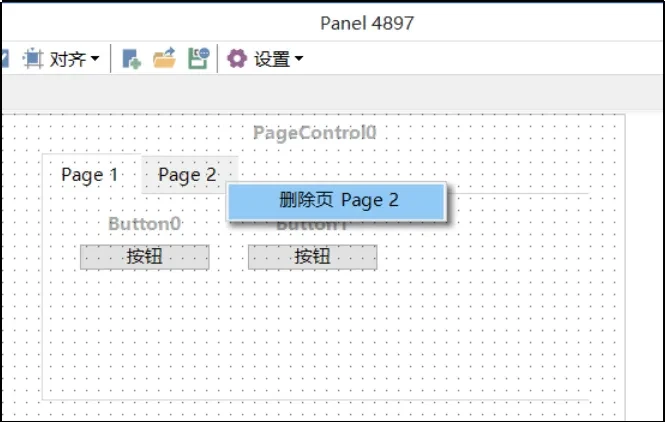
→【Simulation】-【Panel】

Updated content:
Page Control Adds Single-Page Deletion Feature: You can now directly delete selected tabs within the design interface.

Technical Articles 20251216 5 TSMaster November Edition

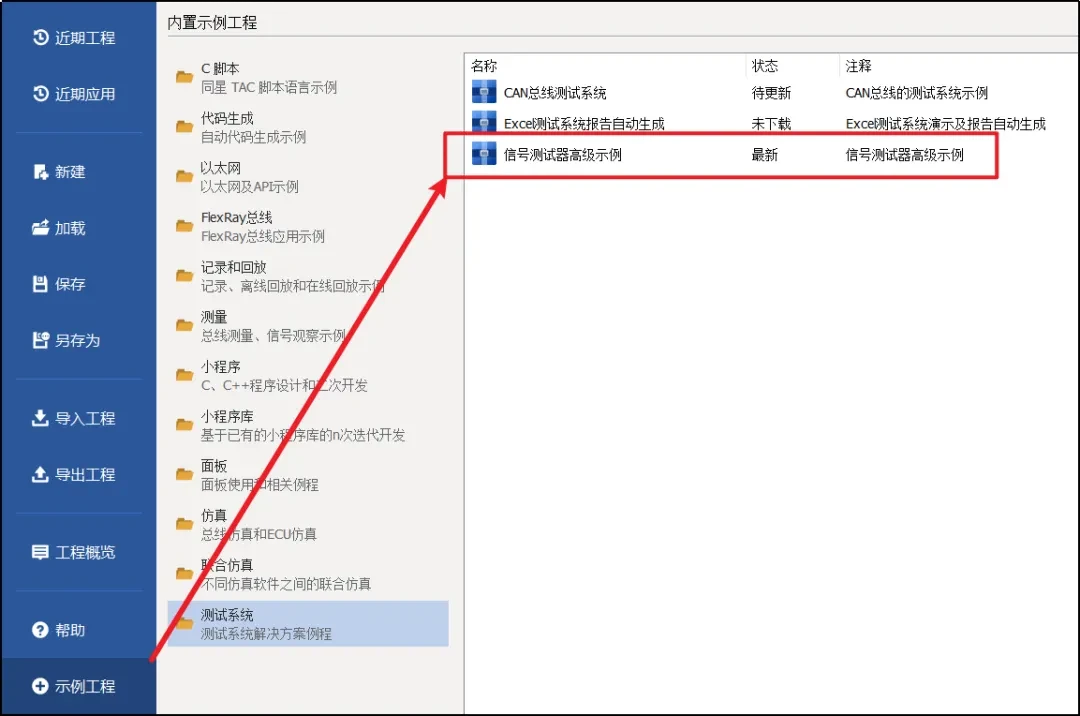
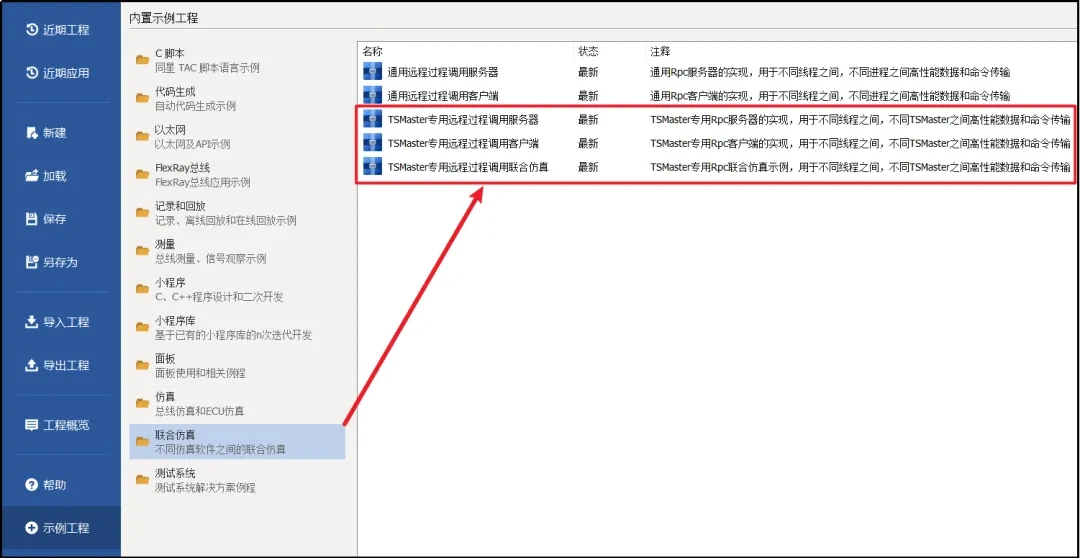
Updated content:
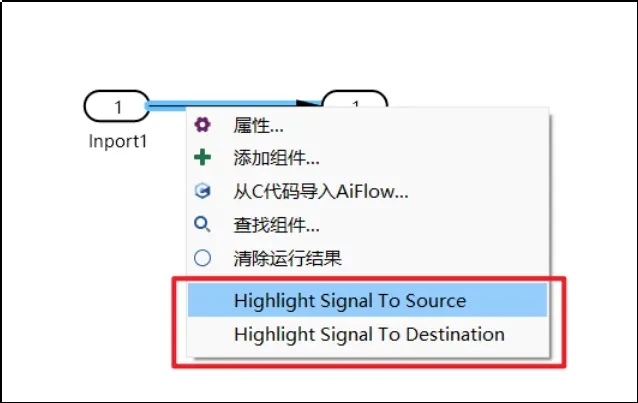
Highlight the source/destination in the MBD block diagram.

Technical Articles 20251216 6 TSMaster November Edition

Technical Articles 202501103 13 TSMaster November Edition

Technical Articles 20251216 7 TSMaster November Edition

→【Hardware】-【Channel Selection】

Updated content:
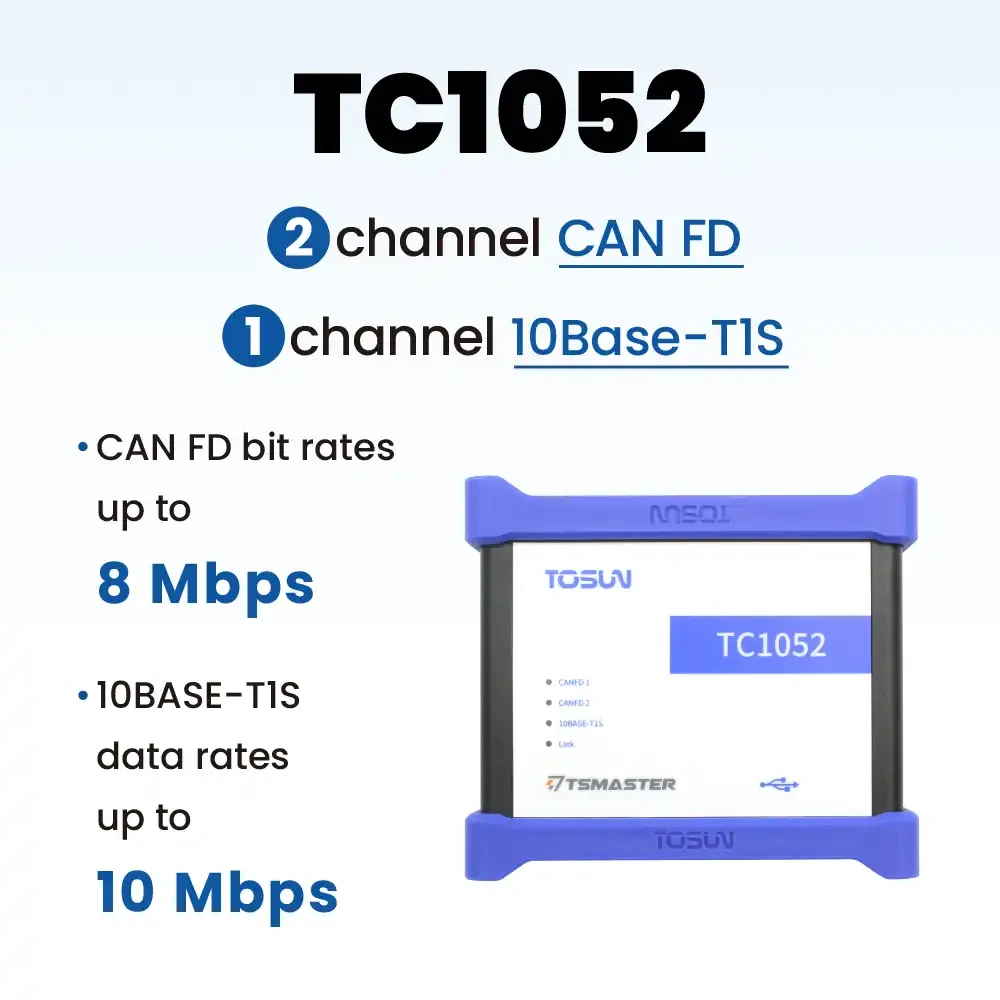
New devices TC1052 and TTS1017Pro have been added to the supported list.

If you have questions about the use of TSMaster software need technical support, welcome to scan the code to add TOSUN technical customer service enterprise micro direct contact and consultation:

Same Star Technical Support QRcode

Tip:
1. Software download:
Click on the software download link below to download and install directly, beta version is recommended:

2. Software upgrades:
You can check for upgrades to the latest version within the software, provided that your computer has an Internet connection.

Note: TOSUN Technical Support Email:support@tosunai.cnWe welcome inquiries! (Company and contact information must be indicated)

发表回复

×
×

产品入口: 产品添加到购物车